Nosema/Vairimorpha microscopy
Procedure for detection and quantification of Nosema/Vairimorpha spores in a honey bee colony.
Video tutorial
Materials
-
Light microscope with built-in camera. Required specification:
- Optical system: optical glass lenses
- Total magnification: 400× (objective: 40×; eyepiece: WF10×)
- Mechanical stage: left-right / forward-backward
- Minimum camera resolution: 0.3 MP
Examples of microscopes meeting these requirements:
-
Forceps
- Mortar and pestle (or another homogenization tool)
- Hemocytometer (preferred) or standard microscope slides
- Cover slips
- Deionized water (preferred) or tap water
- Micropipettes with disposable tips
Sample preparation
1. Collect the bee sample
Use one of the following:
- Dead bees: collect 25 dead worker honey bees from the hygienic bottom board of the hive, provided that the bees are dead (no signs of decay or fungal growth).
- Live bees: collect 25 live worker honey bees caught at the hive entrance.
Storage before examination
If you cannot perform the examination or ship the sample immediately, freezing bees is accepted only for Nosema examinations:
- Each frozen sample must be clearly and easily identified with the hive it comes from.
- Storage temperature: at least −8 °C.
- Bee samples can be stored in the freezer for approximately 3-5 months before the examination.
- Samples must not be thawed and frozen again.
2. Homogenize
- Add 25 mL of deionized water to the bee sample (1 mL per bee).
- Crush (homogenize) the entire bees thoroughly to obtain a uniform slurry.
- Mix the suspension thoroughly: spores tend to settle at the bottom.
Why homogenize whole bees?
Nosema spores are present not only in the alimentary canal but also in the hypopharyngeal glands and in drone semen. Homogenizing whole worker bees ensures comprehensive detection.
Microscope slide preparation
- Using a micropipette, place a small drop (~40 µL) of the well-mixed slurry onto a clean glass slide.
- Cover with a cover slip.
Use a hemocytometer if available
If a hemocytometer is available, use it: counting is easier and more standardized.
Counting spores
- Focus the microscope at 400× magnification using the fine adjustment knob.
- Select five random fields of view (five large grid squares if using a hemocytometer).
- If a field contains excessive debris, choose another at random.
-
Search for Nosema spores in each field of view.
Nosema spp. spores are oval with a dark, well-defined edge (Fig. 1). Be careful not to confuse them with pollen grains, which are larger and perfectly round.
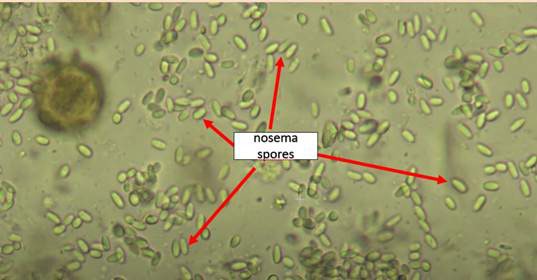
Fig. 1 Microscopic view (400×) of Nosema spp. spores -
Count the number of spores in each field of view and record the values.
- Take a photo of each of the five fields of view to upload them to the Apisense app.
- Calculate the mean number of spores from the five fields of view. It helps you read the result. What goes into the app is the individual field counts, not the mean (see Reporting in the Apisense app).
Example: Table 1
Number of Nosema spores observed in five microscopic fields of view for each sample.
| Sample | Field 1 | Field 2 | Field 3 | Field 4 | Field 5 | Mean |
|---|---|---|---|---|---|---|
| 1 | 40 | 38 | 52 | 44 | 50 | 44.8 |
| 2 | … | … | … | … | … | … |
Reporting in the Apisense app
File the result on the hive the sample came from.
- Open Hive details: the Apiaries tab → the apiary tile → the hive tile.
- In the bottom menu choose Add..., then Examination.
-
On the Add examination screen fill in:
- Examination date: the day you ran the microscopy.
- Examination type: pick Microscopy from the drop-down.
- Photos and spore counts: add 5 photos, one per field of view. Each photo is followed by its own Nosema spore count (1), (2), … (5) field. Enter the number of spores counted in that particular field of view.
-
Save the examination with the confirm button (the ✓ icon) at the bottom of the screen.
You enter the individual field counts, not the mean
The app takes five separate numbers, one per photo. Do not put the mean from Table 1 into it; the mean is there to help you read your own result, while the app receives the individual counts.
The full set is required: without five photos and five counts the app will not save the examination. It shows N of 5 photos missing or flags the empty count field.
The saved examination appears on the Examinations tab of the hive details, where you can open, edit or delete it.
Pilot feature
The Examinations tab and the Examination option in the Add... menu are available to pilot accounts only. How to edit or delete an examination: How to edit or delete an entry.
References
- Bartolomé C, Higes M, Hernández RM, Chen YP, Evans JD, Huang Q. The recent revision of the genera Nosema and Vairimorpha (Microsporidia: Nosematidae) was flawed and misleads the bee scientific community. J Invertebr Pathol. 2024;206: 108146. doi:10.1016/j.jip.2024.108146
- Fries I, Chauzat M-P, Chen Y-P, Doublet V, Genersch E, Gisder S, et al. Standard methods for Nosema research. J Apic Res. 2013;52: 1-28. doi:10.3896/IBRA.1.52.1.14
- Nosemosis of honey bees, WOAH Terrestrial Manual. 2024. WOAH (PDF)
- Mazur ED, Gajda AM. Nosemosis in Honeybees: A Review Guide on Biology and Diagnostic Methods. Applied Sciences. 2022;12: 5890. doi:10.3390/app12125890